
You set up movie night. The call connects, your friend can hear everything, you hit share on Chrome, and Netflix turns into a black rectangle with flawless audio. Ten minutes of Googling later you're toggling settings you've never heard of while your friend eats popcorn to a black screen.
Here's the uncomfortable truth: Discord isn't broken. The black screen is DRM working as designed, which is why every forum fix feels like a coin flip. Below is the real cause, why the workarounds keep dying, and the approach that skips the whole fight.
Why the screen is actually black
DRM and the protected video path
Netflix encrypts its video with Widevine, Google's DRM system. When a title plays in Chrome, the decrypted frames travel through a protected rendering path. Your operating system's compositor knows those pixels are off-limits, so when Discord, Zoom, or OBS asks for a copy of the screen, the OS hands over everything except the video surface. You get the Netflix UI, sometimes subtitles, floating on a void.
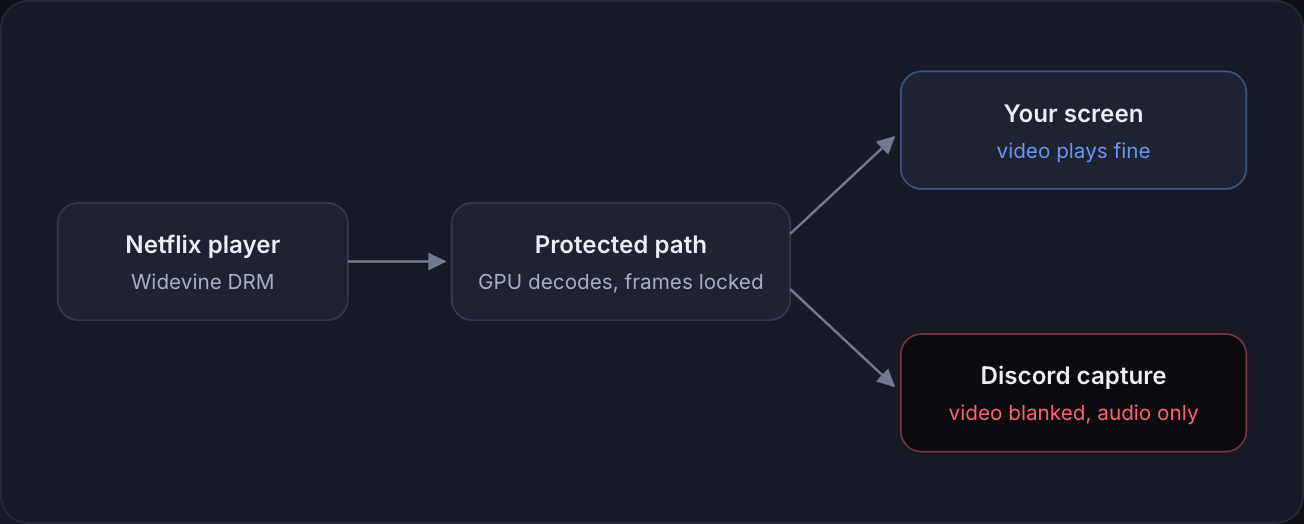
The blackout is intentional. Nobody at Discord can patch it, because the blocking happens below Discord, inside the browser and the OS.
Where hardware acceleration comes in
With hardware acceleration on, video decodes on your GPU and the frames never reach regular memory. Capture software physically cannot read them. Turn acceleration off and decoding moves to the CPU, frames land in ordinary memory, and capture suddenly sees them. That is the entire secret behind the classic forum fix. It's also why the fix is so fragile. Browsers and Netflix keep tightening that path, and any update can re-blacken your stream without warning.
The fixes people try, ranked by wasted time
- Disabling hardware acceleration in Chrome. The classic. Works today, then Chrome updates, the setting resets or the pipeline changes, and it dies on a random Tuesday. Meanwhile your CPU spikes, the fans spin up, and 1080p starts dropping frames.
- Disabling it in Discord too. The second checkbox everyone forgets. Same tradeoffs, same fragility.
- Switching between window capture and screen capture. Mostly placebo. Protection applies to the video surface itself, not your capture mode.
- Trying Edge or the Netflix app instead. Actively worse. Edge on Windows uses PlayReady hardware DRM for higher resolutions, which is even more locked down. Black screen, every time.
- Buying a capture card or HDMI splitter. HDCP was invented specifically to stop this. Money gone, screen still black.
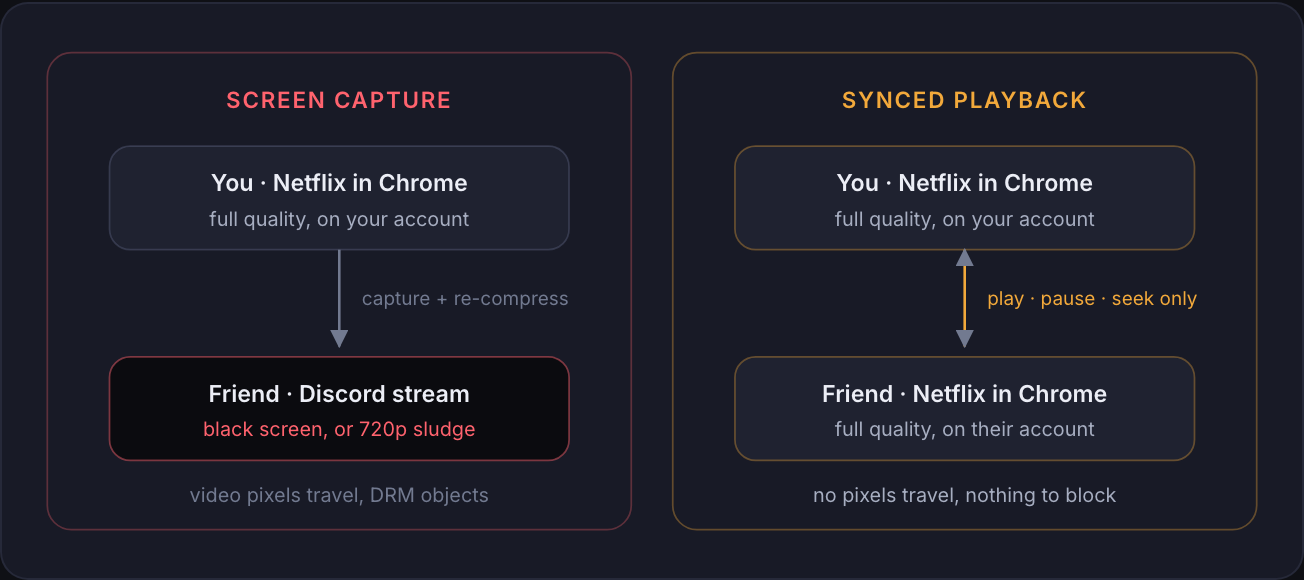
And suppose you win the fight. Discord caps screen share at 720p and 30fps unless you pay for Nitro. Compression turns dark movie scenes into gray sludge. Audio drifts. Your friend is watching a re-compressed copy of a stream that was already compressed once. There's also the fine print: Netflix's terms cover personal viewing, and restreaming your playback to someone else sits in a gray zone where one account carries two viewers.
The actual fix: stop capturing, start syncing
Every workaround above tries to smuggle pixels off your screen. That is the losing move.
The winning move is to send no video at all. A watch party extension syncs playback instead: you both open the same title on your own screens, and the extension keeps the two players locked together. When one of you pauses, both pause. Each person streams directly from Netflix at full quality on their own connection. No captured pixels means DRM has nothing to block, and Discord's compression never touches your movie.
This is what Slonke does
Slonke is a free Chrome extension built for exactly two people. One of you opens a video, starts the party, and sends a single link. The other clicks it. Setup done.
- Frame-perfect sync on Netflix, YouTube, Prime Video, Disney+, Hotstar and more
- Voice and video calling built in, so you can close Discord entirely
- A floating chat over the video, with games inside it
- No accounts, no tracking, peer-to-peer and encrypted
One honest tradeoff: both people need their own access to the video. If only one of you has Netflix, syncing can't conjure a second subscription. For YouTube none of this matters, since it's free anyway.
Watching with a partner in another city? We compared every tool long distance couples actually use, gotchas included, in how to watch Netflix together long distance.
Quick answers
Why is Netflix black when I screen share on Discord?
DRM (Widevine) blocks protected video from capture. The OS blanks the video surface before Discord ever sees it.
Does disabling hardware acceleration fix it?
Often, temporarily. You pay in CPU load and dropped frames, and updates keep breaking it.
How do I watch Netflix with a friend in full quality?
Sync playback instead of streaming your screen. Add Slonke to Chrome and send one link.